不用 class 如何实现继承?用 class 又如何实现?
不用 class 这样实现
1 | function Animal(color){ |
用 class 就简单了
1 | class Animal{ |
1 | function Animal(color){ |
1 | class Animal{ |
开发中常用的一些正则表达式整理
1 数字:^[0-9]*$
2 n位的数字:^\d{n}$
3 至少n位的数字:^\d{n,}$
4 m-n位的数字:^\d{m,n}$
5 零和非零开头的数字:^(0|[1-9][0-9]*)$
6 非零开头的最多带两位小数的数字:^([1-9][0-9]*)+(.[0-9]{1,2})?$
7 带1-2位小数的正数或负数:^(-)?\d+(.\d{1,2})?$
8 正数、负数、和小数:^(-|+)?\d+(.\d+)?$
9 有两位小数的正实数:^[0-9]+(.[0-9]{2})?$
10 有1~3位小数的正实数:^[0-9]+(.[0-9]{1,3})?$
11 非零的正整数:^[1-9]\d$ 或 ^([1-9][0-9]){1,3}$ 或 ^+?[1-9][0-9]*$
12 非零的负整数:^-[1-9][]0-9”$ 或 ^-[1-9]\d$
13 非负整数:^\d+$ 或 ^[1-9]\d*|0$
14 非正整数:^-[1-9]\d*|0$ 或 ^((-\d+)|(0+))$
15 非负浮点数:^\d+(.\d+)?$ 或 ^[1-9]\d.\d|0.\d[1-9]\d|0?.0+|0$
16 非正浮点数:^((-\d+(.\d+)?)|(0+(.0+)?))$ 或 ^(-([1-9]\d.\d|0.\d[1-9]\d))|0?.0+|0$
17 正浮点数:^[1-9]\d.\d|0.\d[1-9]\d$ 或 ^(([0-9]+.[0-9][1-9][0-9])|([0-9][1-9][0-9].[0-9]+)|([0-9][1-9][0-9]))$
18 负浮点数:^-([1-9]\d.\d|0.\d[1-9]\d)$ 或 ^(-(([0-9]+.[0-9][1-9][0-9])|([0-9][1-9][0-9].[0-9]+)|([0-9][1-9][0-9])))$
19 浮点数:^(-?\d+)(.\d+)?$ 或 ^-?([1-9]\d.\d|0.\d[1-9]\d|0?.0+|0)$
1 汉字:^[\u4e00-\u9fa5]{0,}$
2 英文和数字:^[A-Za-z0-9]+$ 或 ^[A-Za-z0-9]{4,40}$
3 长度为3-20的所有字符:^.{3,20}$
4 由26个英文字母组成的字符串:^[A-Za-z]+$
5 由26个大写英文字母组成的字符串:^[A-Z]+$
6 由26个小写英文字母组成的字符串:^[a-z]+$
7 由数字和26个英文字母组成的字符串:^[A-Za-z0-9]+$
8 由数字、26个英文字母或者下划线组成的字符串:^\w+$ 或 ^\w{3,20}$
9 中文、英文、数字包括下划线:^[\u4E00-\u9FA5A-Za-z0-9_]+$
10 中文、英文、数字但不包括下划线等符号:^[\u4E00-\u9FA5A-Za-z0-9]+$ 或 ^[\u4E00-\u9FA5A-Za-z0-9]{2,20}$
11 可以输入含有^%&’,;=?$\”等字符:[^%&’,;=?$\x22]+
12 禁止输入含有~的字符:[^~\x22]+
1 Email地址:^\w+([-+.]\w+)@\w+([-.]\w+).\w+([-.]\w+)*$
2 域名:[a-zA-Z0-9][-a-zA-Z0-9]{0,62}(/.[a-zA-Z0-9][-a-zA-Z0-9]{0,62})+/.?
3 InternetURL:[a-zA-z]+://[^\s] 或 ^http://([\w-]+.)+[\w-]+(/[\w-./?%&=])?$
4 手机号码:^(13[0-9]|14[5|7]|15[0|1|2|3|5|6|7|8|9]|18[0|1|2|3|5|6|7|8|9])\d{8}$
5 电话号码(“XXX-XXXXXXX”、”XXXX-XXXXXXXX”、”XXX-XXXXXXX”、”XXX-XXXXXXXX”、”XXXXXXX”和”XXXXXXXX):^((\d{3,4}-)|\d{3.4}-)?\d{7,8}$
6 国内电话号码(0511-4405222、021-87888822):\d{3}-\d{8}|\d{4}-\d{7}
7 身份证号(15位、18位数字):^\d{15}|\d{18}$
8 短身份证号码(数字、字母x结尾):^([0-9]){7,18}(x|X)?$ 或 ^\d{8,18}|[0-9x]{8,18}|[0-9X]{8,18}?$
9 帐号是否合法(字母开头,允许5-16字节,允许字母数字下划线):^[a-zA-Z][a-zA-Z0-9_]{4,15}$
10 密码(以字母开头,长度在6~18之间,只能包含字母、数字和下划线):^[a-zA-Z]\w{5,17}$
11 强密码(必须包含大小写字母和数字的组合,不能使用特殊字符,长度在8-10之间):^(?=.\d)(?=.[a-z])(?=.*[A-Z]).{8,10}$
12 日期格式:^\d{4}-\d{1,2}-\d{1,2}
13 一年的12个月(01~09和1~12):^(0?[1-9]|1[0-2])$
14 一个月的31天(01~09和1~31):^((0?[1-9])|((1|2)[0-9])|30|31)$
15 钱的输入格式:
16 1.有四种钱的表示形式我们可以接受:”10000.00” 和 “10,000.00”, 和没有 “分” 的 “10000” 和 “10,000”:^[1-9][0-9]*$
17 2.这表示任意一个不以0开头的数字,但是,这也意味着一个字符”0”不通过,所以我们采用下面的形式:^(0|[1-9][0-9]*)$
18 3.一个0或者一个不以0开头的数字.我们还可以允许开头有一个负号:^(0|-?[1-9][0-9]*)$
19 4.这表示一个0或者一个可能为负的开头不为0的数字.让用户以0开头好了.把负号的也去掉,因为钱总不能是负的吧.下面我们要加的是说明可能的小数部分:^[0-9]+(.[0-9]+)?$
20 5.必须说明的是,小数点后面至少应该有1位数,所以”10.”是不通过的,但是 “10” 和 “10.2” 是通过的:^[0-9]+(.[0-9]{2})?$
21 6.这样我们规定小数点后面必须有两位,如果你认为太苛刻了,可以这样:^[0-9]+(.[0-9]{1,2})?$
22 7.这样就允许用户只写一位小数.下面我们该考虑数字中的逗号了,我们可以这样:^[0-9]{1,3}(,[0-9]{3})*(.[0-9]{1,2})?$
23 8.1到3个数字,后面跟着任意个 逗号+3个数字,逗号成为可选,而不是必须:^([0-9]+|[0-9]{1,3}(,[0-9]{3})*)(.[0-9]{1,2})?$
24 备注:这就是最终结果了,别忘了”+”可以用”*”替代如果你觉得空字符串也可以接受的话(奇怪,为什么?)最后,别忘了在用函数时去掉去掉那个反斜杠,一般的错误都在这里
25 xml文件:^([a-zA-Z]+-?)+[a-zA-Z0-9]+\.[x|X][m|M][l|L]$
26 中文字符的正则表达式:[\u4e00-\u9fa5]
27 双字节字符:[^\x00-\xff] (包括汉字在内,可以用来计算字符串的长度(一个双字节字符长度计2,ASCII字符计1))
28 空白行的正则表达式:\n\s*\r (可以用来删除空白行)
29 HTML标记的正则表达式:<(\s?)[^>]>.?|<.?> (网上流传的版本太糟糕,上面这个也仅仅能部分,对于复杂的嵌套标记依旧无能为力)
30 首尾空白字符的正则表达式:^\s|\s$或(^\s)|(\s$) (可以用来删除行首行尾的空白字符(包括空格、制表符、换页符等等),非常有用的表达式)
31 腾讯QQ号:[1-9][0-9]{4,} (腾讯QQ号从10000开始)
32 中国邮政编码:[1-9]\d{5}(?!\d) (中国邮政编码为6位数字)
33 IP地址:\d+.\d+.\d+.\d+ (提取IP地址时有用)
34 IP地址:((?:(?:25[0-5]|2[0-4]\d|[01]?\d?\d)\.){3}(?:25[0-5]|2[0-4]\d|[01]?\d?\d))
节流的原理很简单:
如果你持续触发事件,每隔一段时间,只执行一次事件。
根据首次是否执行以及结束后是否执行,效果有所不同,实现的方式也有所不同。
我们用 leading 代表首次是否执行,trailing 代表结束后是否再执行一次。
关于节流的实现,有两种主流的实现方式,一种是使用时间戳,一种是设置定时器。
让我们来看第一种方法:使用时间戳,当触发事件的时候,我们取出当前的时间戳,然后减去之前的时间戳(最一开始值设为 0 ),如果大于设置的时间周期,就执行函数,然后更新时间戳为当前的时间戳,如果小于,就不执行。
看了这个表述,是不是感觉已经可以写出代码了…… 让我们来写第一版的代码:
1 | function throttle(func, wait) { |
例子依然是用讲 debounce 中的例子,如果你要使用:1
container.onmousemove = throttle(getUserAction, 1000);
效果演示如下:
我们可以看到:当鼠标移入的时候,事件立刻执行,每过 1s 会执行一次,如果在 4.2s 停止触发,以后不会再执行事件。
使用定时器
接下来,我们讲讲第二种实现方式,使用定时器。
当触发事件的时候,我们设置一个定时器,再触发事件的时候,如果定时器存在,就不执行,直到定时器执行,然后执行函数,清空定时器,这样就可以设置下个定时器。
1 | function throttle(func, wait) { |
为了让效果更加明显,我们设置 wait 的时间为 3s,效果演示如下:

使用定时器
我们可以看到:当鼠标移入的时候,事件不会立刻执行,晃了 3s 后终于执行了一次,此后每 3s 执行一次,当数字显示为 3 的时候,立刻移出鼠标,相当于大约 9.2s 的时候停止触发,但是依然会在第 12s 的时候执行一次事件。
所以比较两个方法:
第一种事件会立刻执行,第二种事件会在 n 秒后第一次执行
第一种事件停止触发后没有办法再执行事件,第二种事件停止触发后依然会再执行一次事件
在前端开发中会遇到一些频繁的事件触发,比如:
为此,我们举个示例代码来了解事件如何频繁的触发:
我们写个 index.html 文件:1
2
3
4
5
6
7
8
9
10
11
12
13
14
15
16
17
18
19
20<!DOCTYPE html>
<html lang="zh-cmn-Hans">
<head>
<meta charset="utf-8">
<meta http-equiv="x-ua-compatible" content="IE=edge, chrome=1">
<title>debounce</title>
<style>
#container{
width: 100%; height: 200px; line-height: 200px; text-align: center; color: #fff; background-color: #444; font-size: 30px;
}
</style>
</head>
<body>
<div id="container"></div>
<script src="debounce.js"></script>
</body>
</html>
debounce.js 文件的代码如下:
1 | var count = 1; |
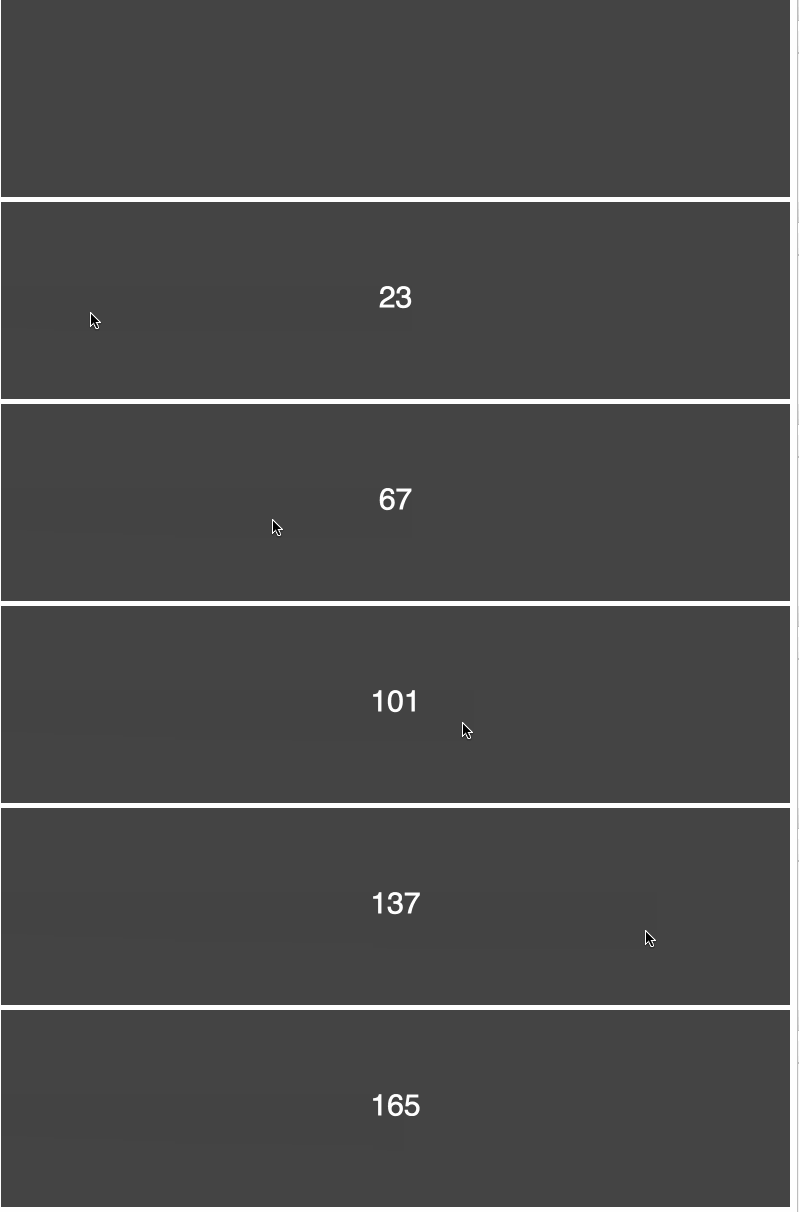
防抖的原理就是:你尽管触发事件,但是我一定在事件触发 n 秒后才执行,如果你在一个事件触发的 n 秒内又触发了这个事件,那我就以新的事件的时间为准,n 秒后才执行,总之,就是要等你触发完事件 n 秒内不再触发事件,我才执行,真是任性呐!
1 | function debounce(func, wait) { |
如果我们要使用它,以最一开始的例子为例:1
container.onmousemove = debounce(getUserAction, 1000);

现在随你怎么移动,反正你移动完 1000ms 内不再触发,我才执行事件。看看使用效果:
顿时就从 165 次降低成了 1 次!
如果我们在 getUserAction 函数中 console.log(this),在不使用 debounce 函数的时候,this 的值为:1
<div id="container"></div>
但是如果使用我们的 debounce 函数,this 就会指向 Window 对象!
所以我们需要将 this 指向正确的对象。
我们修改下代码:
1 | function debounce(func, wait) { |
现在 this 已经可以正确指向了。让我们看下个问题:
JavaScript 在事件处理函数中会提供事件对象 event,我们修改下 getUserAction 函数:1
2
3
4function getUserAction(e) {
console.log(e);
container.innerHTML = count++;
};
如果我们不使用 debouce 函数,这里会打印 MouseEvent 对象,如图所示:

但是在我们实现的 debounce 函数中,却只会打印 undefined!
所以我们再修改一下代码:
1 | function debounce(func, wait) { |
1 | var a={"name":"tom","sex":"男","age":"22"}; |
这些方法通常用在对象上,但它们也可以在数组上使用:
1 | onst myArr = ['white', 'yellow', 'red']; |
了解了 Math.max 方法,我们以求数组最大值的为例,思考有哪些方法可以实现这个需求。
最最原始的方法,莫过于循环遍历一遍:1
2
3
4
5
6
7var arr = [6, 4, 1, 8, 2, 11, 23];
var result = arr[0];
for (var i = 1; i < arr.length; i++) {
result = Math.max(result, arr[i]);
}
console.log(result);
既然是通过遍历数组求出一个最终值,那么我们就可以使用 reduce 方法:1
2
3
4
5
6var arr = [6, 4, 1, 8, 2, 11, 23];
function max(prev, next) {
return Math.max(prev, next);
}
console.log(arr.reduce(max));
如果我们先对数组进行一次排序,那么最大值就是最后一个值:1
2
3
4var arr = [6, 4, 1, 8, 2, 11, 23];
arr.sort(function(a,b){return a - b;});
console.log(arr[arr.length - 1])
Math.max 支持传多个参数来进行比较,那么我们如何将一个数组转换成参数传进 Math.max 函数呢?eval 便是一种1
2
3
4var arr = [6, 4, 1, 8, 2, 11, 23];
var max = eval("Math.max(" + arr + ")");
console.log(max)
使用 apply 是另一种。1
2var arr = [6, 4, 1, 8, 2, 11, 23];
console.log(Math.max.apply(null, arr))
使用 ES6 的扩展运算符:1
2var arr = [6, 4, 1, 8, 2, 11, 23];
console.log(Math.max(...arr))
我们可以在DOM元素上绑定onclick、onmouseover、onmouseout、onmousedown、onmouseup、ondblclick、onkeydown、onkeypress、onkeyup等。好多不一一列出了。如果想知道更多事件类型请查看1
2
3
4
5
6<input type="button" value="click me" onclick="hello()">
<script>
function hello(){
alert("hello world!");
}
</script>
1 | <input type="button" value="按钮" id="btn"> |
绑定事件的另一种方法是用 addEventListener() 或 attachEvent() 来绑定事件监听函数
关于事件监听,W3C规范中定义了3个事件阶段,依次是捕获阶段、目标阶段、冒泡阶段。
1 | element.addEventListener(event, function, useCapture) |
1 | <input type="button" value="click me" id="btn1"> |
注:IE8以下不支持
语法:1
element.attachEvent(event, function)
1 | <input type="button" value="click me" id="btn2"> |
1 | // 常规的事件绑定只执行最后绑定的事件。 |
1 | //两个事件都执行了。 |
1 | <input type="button" value="click me" id="btn5"> |
1 | <input type="button" value="click me" id="btn5"> |
用var声明的变量的作用域是它当前的执行上下文,它可以是嵌套的函数,也可以是声明在任何函数外的变量。let和const是块级作用域,意味着它们只能在最近的一组花括号(function、if-else 代码块或 for 循环中)中访问。1
2
3
4
5
6
7
8
9
10
11
12
13
14function foo() {
// 所有变量在函数中都可访问
var bar = 'bar';
let baz = 'baz';
const qux = 'qux';
console.log(bar); // bar
console.log(baz); // baz
console.log(qux); // qux
}
console.log(bar); // ReferenceError: bar is not defined
console.log(baz); // ReferenceError: baz is not defined
console.log(qux); // ReferenceError: qux is not defined
1 | if (true) { |
1 | console.log(foo); // undefined |
1 | var foo = 'foo'; |
1 | // 这样不会报错。 |
遍历数组中的元素。
为每个元素执行回调。
无返回值。1
2
3
4
5
6const a = [1, 2, 3];
const doubled = a.forEach((num, index) => {
// 执行与 num、index 相关的代码
});
// doubled = undefined
遍历数组中的元素
通过对每个元素调用函数,将每个元素“映射(map)”到一个新元素,从而创建一个新数组。1
2
3
4
5
6const a = [1, 2, 3];
const doubled = a.map(num => {
return num * 2;
});
// doubled = [2, 4, 6]
.forEach和.map()的主要区别在于.map()返回一个新的数组。如果你想得到一个结果,但不想改变原始数组,用.map()。如果你只需要在数组上做迭代修改,用forEach。
for循环:
for (var property in obj) { console.log(property); }但是,这还会遍历到它的继承属性,在使用之前,你需要加入obj.hasOwnProperty(property)检查。
Object.keys():
Object.keys(obj).forEach(function (property) { … })Object.keys()方法会返回一个由一个给定对象的自身可枚举属性组成的数组。
Object.getOwnPropertyNames()方法返回一个由指定对象的所有自身属性的属性名(包括不可枚举属性但不包括 Symbol 值作为名称的属性)组成的数组。for loops:
for (var i = 0; i < arr.length; i++)
这里的常见错误是var是函数作用域而不是块级作用域,大多数时候你想要迭代变量在块级作用域中。ES2015 引入了具有块级作用域的let,建议使用它。所以就变成了:for (let i = 0; i < arr.length; i++)。
forEach:
arr.forEach(function (el, index) { … })
这个语句结构有时会更精简,因为如果你所需要的只是数组元素,你不必使用index。还有every和some方法可以让你提前终止遍历。